Mooc es el acrónimo en inglés de Massive Online Open Courses ( ó Cursos
online masivos y abiertos ). Los cursos masivos no han sido otra cosa
que la evolución de la educación abierta en internet
http://mooc.es/
cientos de cursos en español, super buenos
jueves, 23 de junio de 2016

miércoles, 30 de marzo de 2016
Como evitar los virus informáticos v1

El computador es una herramienta que hace lo que le decimos, todavia no es autonomo :-) Siendo asi :-)
Soy responsable de usalo adecuadamente y debo tener CONCIENCIA de la informacion que recibo :-)

Consejos para evitar los virus informáticos
Verifica, antes de abrir, cada nuevo mensaje de correo electrónico recibido

Para prevenir esto, lo mejor es verificar los mensajes inesperados o que provengan de una fuente poco habitual. Un indicativo de posible virus es la existencia en el asunto del mensaje de palabras en un idioma diferente al utilizado normalmente por el remitente.
Evita la descarga de programas de lugares no seguros en Internet

Rechaza archivos que no hayas solicitado cuando estés en chats o grupos de noticias (news)

Ambos sistemas, además de permitir la comunicación con otras personas, también facilitan la transferencia de archivos. Aquí es donde hay que tener especial cuidado y aceptar sólo lo que llegue de un remitente conocido y de confianza.
Retira los disquetes de las disqueteras, CD's o DVD's, incluso las memorias USB al apagar o reiniciar el ordenador

Por si se nos olvida hacerlo, es conveniente contar con un antivirus capaz de comprobar en tales circunstancias la existencia de disquetes infectados.
Realiza periódicamente copias de seguridad

Fuente: http://salva.sbsnet.es/wiki/index.php?title=Consejos_para_evitar_los_virus_inform%C3%A1ticos
martes, 29 de marzo de 2016
Diagramas avanzados Open Source alternativas a Microsoft Visio
Esta herramienta posee una interfaz ideal para la creación de diagramas
avanzados y diseños, y lo bueno es que permite a los usuarios conectar
esos diagramas creados a de bases de datos para luego mostrar esa información de forma gráfica.
 Inkscape
https://inkscape.org/es/acerca-de/de-un-vistazo/
Inkscape es un editor de gráficos vectoriales de código abierto, similar a programas como Adobe Illustrator, Corel Draw, Freehand, Xara X... Lo que lo hace único es que usa como formato nativo el Scalable Vector Graphics (SVG), un estándar abierto de W3C basado en XML.
 Dia Diagram
https://sourceforge.net/projects/dia-installer/?source=directory#reviews
Dia Diagram Editor is free Open Source drawing software for Windows, Mac OS X and Linux. Dia supports more than 30 different diagram types like flowcharts, network diagrams, database models. More than a thousand readymade objects help to draw professional diagrams. Dia can read and write a number of different raster and vector image formats
Inkscape https://inkscape.org/es/acerca-de/de-un-vistazo/
Inkscape es un editor de gráficos vectoriales de código abierto, similar a programas como Adobe Illustrator, Corel Draw, Freehand, Xara X... Lo que lo hace único es que usa como formato nativo el Scalable Vector Graphics (SVG), un estándar abierto de W3C basado en XML.
https://sourceforge.net/projects/dia-installer/?source=directory#reviews
Dia Diagram Editor is free Open Source drawing software for Windows, Mac OS X and Linux. Dia supports more than 30 different diagram types like flowcharts, network diagrams, database models. More than a thousand readymade objects help to draw professional diagrams. Dia can read and write a number of different raster and vector image formats
Features
- Draw structured diagrams (flowcharts, network layouts, etc)
- Easy to use (Recommended in 89% of the user ratings)
- More than 1000 predefined objects and symbols
- Supports Windows, Mac OS X and Linux
- Many im- and export formats
- Scriptable via Python
miércoles, 16 de marzo de 2016
Monitores de red Open Source
Hay dejo varias fuentes, abajo relacionadas :-)
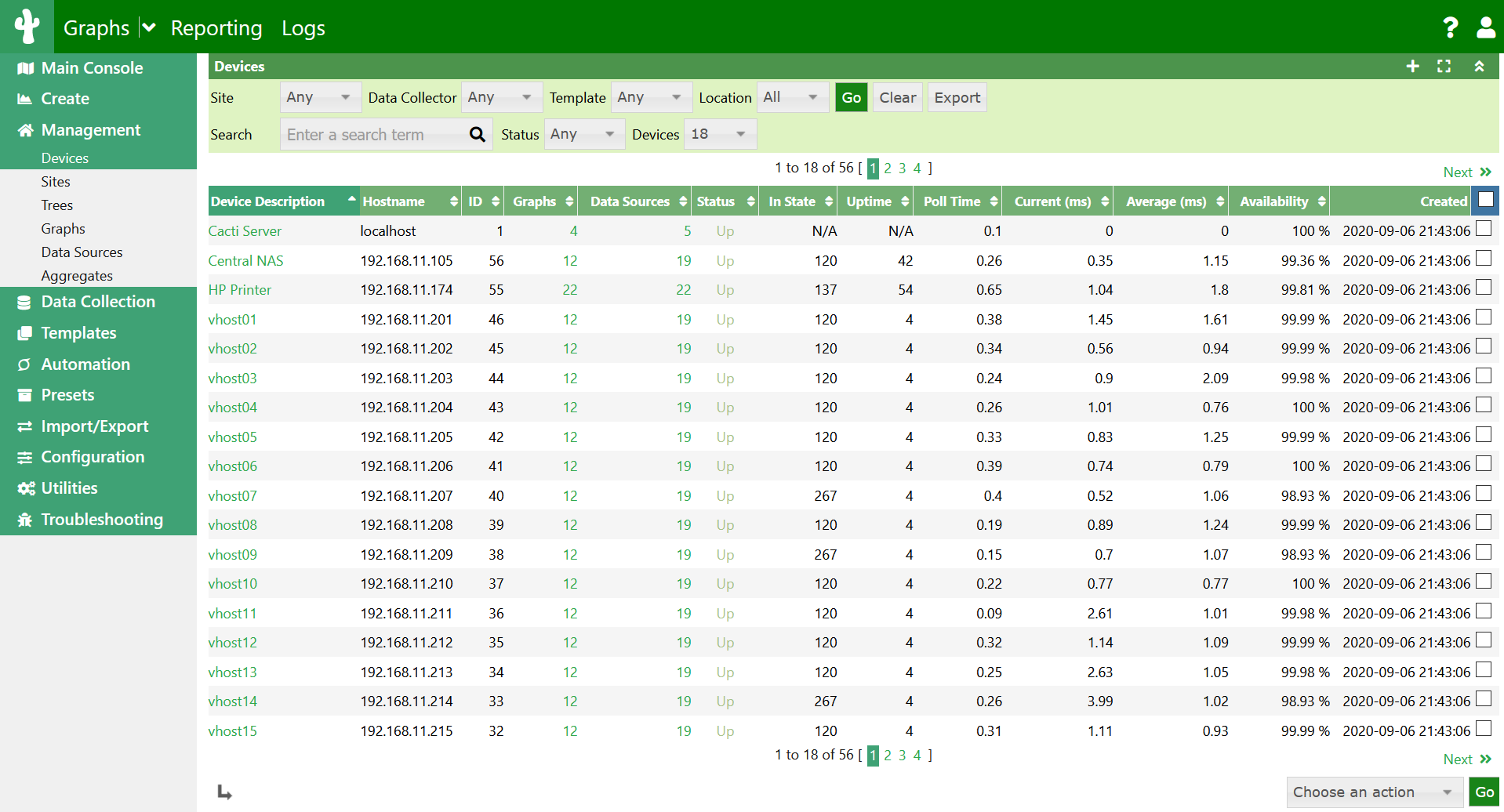
http://www.cacti.net/
About Cacti
Cacti is a complete network graphing solution designed to harness the power of RRDTool's data storage and graphing functionality. Cacti provides a fast poller, advanced graph templating, multiple data acquisition methods, and user management features out of the box. All of this is wrapped in an intuitive, easy to use interface that makes sense for LAN-sized installations up to complex networks with hundreds of devices.
Icinga
Icinga is an offshoot
of Nagios that is currently being rebuilt anew. It offers a thorough
monitoring and alerting framework that’s designed to be as open and
extensible as Nagios is, but with several different Web UI options.
Icinga 1 is closely related to Nagios, while Icinga 2 is the rewrite.
Both versions are currently supported, and Nagios users can migrate to
Icinga 1 very easily.
NeDi
NeDi may not be as well
known as some of the others, but it’s a great solution for tracking
devices across a network. It continuously walks through a network
infrastructure and catalogs devices, keeping track of everything it
discovers. It can provide the current location of any device, as well as
a history.
NeDi can be used to locate stolen or lost devices by alerting you if they reappear on the network. It can even display all known and discovered connections on a map, showing how every network interconnect is laid out, down to the physical port level.
NeDi can be used to locate stolen or lost devices by alerting you if they reappear on the network. It can even display all known and discovered connections on a map, showing how every network interconnect is laid out, down to the physical port level.
Observium
Observium combines
system and network monitoring with performance trending. It uses both
static and auto discovery to identify servers and network devices,
leverages a variety of monitoring methods, and can be configured to
track just about any available metric. The Web UI is very clean, well
thought out, and easy to navigate.As shown, Observium can also display the physical location of monitored devices on a geographical map. Note too the heads-up panels showing active alarms and device counts.
Zabbix
Zabbix monitors servers
and networks with an extensive array of tools. There are Zabbix agents
for most operating systems, or you can use passive or external checks,
including SNMP to monitor hosts and network devices. You'll also find
extensive alerting and notification facilities, and a highly
customizable Web UI that can be adapted to a variety of heads-up
displays. In addition, Zabbix has specific tools that monitor Web
application stacks and virtualization hypervisors.
Zabbix can also produce logical interconnection diagrams detailing how certain monitored objects are interconnected. These maps are customizable, and maps can be created for groups of monitored devices and hosts.
Zabbix can also produce logical interconnection diagrams detailing how certain monitored objects are interconnected. These maps are customizable, and maps can be created for groups of monitored devices and hosts.
Fuentes:
1 http://www.networkworld.com/article/2880536/network-management/best-open-source-monitoring-tools.html
2 http://www.infoworld.com/article/2683857/network-monitoring/article.html#slide7
jueves, 10 de marzo de 2016
Eventos administracion - Open Source Event Manager
Administracion de eventos Open Source
http://osem.io/
OpenSourceEventManagement OSEM
OSEM le ayuda a pedir papeles en su comunidad. Recibir, clasificar, evaluar y presentaciones de programación para el evento.
OSEM le ayuda a comunicar el valor de su evento. Crear una página de bienvenida y el orden del día. Permite que los visitantes se registren y compre los boletos para su evento.
OSEM le apoya con mantenerse en la cima de su evento. Obtenga información sobre la evolución del programa y la audiencia de su evento.
OSEM helps you to call for papers in your community. Receive, classify, evaluate and schedule submissions for your event.
12 soluciones mas de administracion de eventos Open Source
fuente: http://blog.capterra.com/free-event-management-software/

Finding the latter for free, when it works well and meets your event planning needs, can save you precious dollars and also from using a few other four-letter words.
Here’s our list of the top open source and free event management software out there:

In its free version, this platform creates event registration forms. For one user, it includes five forms, with up to 10 fields in each. You are also limited to collecting 100 submissions each month.
To get payment integration, you’ll have to upgrade to the Platinum or Diamond versions.
The good news is 123ContactForm integrates with WordPress and a number of other publishing platforms, as well as Facebook, Twitter and Hootsuite.

Anyvite lets you create event invitations, to be sent by email or posted publically on a webpage. They can be personalized with your own image, or you can choose from pre-made designs. Once they’re sent, you can message guests based on their RSVP and add an Anyvite widget to your site.
Ticketing and payment collection, however, incur a separate fee of $0.99 plus 2.5% of the ticket price, with card processing fees on top of that.

The free edition of Event Track is made to work with the free online event registration platform Jolly Events.
With Jolly Events, you can register attendees online on a customized registration form, send invitations, and send registration confirmation emails with barcodes. Then you can export your guest data for Event Track, which lets you register attendees on-site, register them for specific sessions of an event, print nametags, and scan barcodes to verify them.
Be wary, though: the free edition is “as is.” Jolly Events does not offer any warranty, or email or phone support for this product.

Event management on the EB Basic level is completely free. It’s robust for a free version, and includes a wide range of features, including event registration, an event page, and up to 500 email invitations.
Plus, you have options for collecting payments, which can go directly into your Paypal account. You’ll also be able to track progress and produce reports.
To get automated invoice and online payments, customize your event page’s look and remove ads, or offer an offline payment option, you’ll have to upgrade to the premium version, which has a 2% per ticket fee (which can be added to the ticket price).

If all you need is an invitation and RSVP system, the free version of Evite will fit the bill. The ad-supported option has a limit of 750 invitations, with a large selection of designs.
The premium version (price varies based on number of guests) allows you to customize invitations.

Specifically geared to planning a wedding, Seating Arrangement does more than just manage table space. It will be useful to any planner working on a banquet or dinner event.
You can use it to manage the guest list and menu options, sort guests by preferences like age or social group, track RSVPs, and print place cards. Its web-based design lets you work on your event from multiple locations.
If you are willing to host your own server, provide your own support for your maintenance issues, and abide by the license, OpenConf Community Edition is free for download and use.
Unfortunately the software does not cover the more advanced and new aspects of event management software, such as social media integration and mobile app use, as well as key features such as ticketing and vendor management. So, you take what you can get when it comes to OpenConf.
![2015-10-09_11_37_54-Free_Event_Management_Software_[_EL7-FRE_]](http://blog.capterra.com/wp-content/uploads/2015/05/2015-10-09_11_37_54-Free_Event_Management_Software__EL7-FRE_-720x440.png)
Whether you want to host offline native software or run your event management system online, Jolly Tech has you covered with their free edition of EventLeaf. If you are running a PC with Windows Vista or higher and accept no warranty or tech support, you will be able to enjoy the benefits of EventLeaf.
Jolly Tech’s new free event management software is an updated version of their own “EventTrack” which was solely an online platform, but which can now be run offline on your system at your command. All of the old features, such as on-site event attendee registration and badge creation, have been retained with a newer, more polished look.

RSVPify may be geared towards weddings, as advertised on the main page, however it is easily adaptable to any type of event. This option offers a free plan which covers up to 100 RSVPs, a custom URL, customization options, data imports, and many other features.
To unlock unlimited RSVPs, unlimited guest tracking, and high-end features you have to upgrade to a paid plan starting at $8.99 a month.

Event Espresso Lite is a free WordPress plugin version of the paid full version. Despite being a free plugin, Event Espresso Lite is a solid option for event managers to integrate their registration and event management process with their WordPress website, making for a more seamless transition between event management functions and your main site.
This version is currently on its third generation but is soon to be replaced by Event Espresso 4.

VSIS ConfTool, ConfTool’s open source system, is available through a free license for noncommercial events. It is intended for academic and nonprofessional event planners.
For up to 150 participants, it offers a customizable registration form, file uploading and online submissions, and online review forms. At a conference, you can use it to check in attendees.
For payment processing other than cash, check, or bank transfer, you’ll need the pro edition.

This box office and ticketing software is aimed at small venues and charity organizations. It allows you to sell tickets online, including e-tickets with barcodes, as well as have POS capability at the box office.
The system is customizable with templates, allowing you to set seating charts and pricing categories. It has a ticket taker interface for entry, too.

Odoo’s open source event app has a slew of features for every stage in the event planning process.
You can create event pages with a user-friendly editor, and make agendas for each event. Sell tickets online at multiple levels, promote using automated emailing and social media integration, and track site success with Google Analytics.
Odoo also offers SEO tools and landing pages, and integrates fully with the rest of the Odoo suite of apps.

This tool was created for scholarly conferences. With OCS, you can create a conference website, call for paper submissions, post papers in a searchable format, and register participants.
After the conference has come and gone, it also has online discussion abilities to keep the conversation going.

For those who are particularly tech-savvy, OpenConferenceWare requires a Rails application.
It’s customizable, and is a platform where anyone can list sessions for an event, create and update proposals, subscribe to a feed, show rooms, and create a profile. Administrators can create and change events, set proposal deadlines, and manage rooms and sessions.

OSEM has a broad array of capabilities in an open source format.
With it, you can build a website for your event and a detailed schedule for attendees with session information pages as well. Attendees can use it to register and submit proposals, while planners can track everything from registrations to venues to sponsorship in the administrator dashboard.
Standard features include event websites, online registration, payment processing, email communication, social media integration, and analytics. They also tend to be easy-to-use, but not customizable.
Here are the 13 software options in this category (free for free events are marked with an *):
http://osem.io/
OpenSourceEventManagement OSEM
OSEM le ayuda a pedir papeles en su comunidad. Recibir, clasificar, evaluar y presentaciones de programación para el evento.
OSEM le ayuda a comunicar el valor de su evento. Crear una página de bienvenida y el orden del día. Permite que los visitantes se registren y compre los boletos para su evento.
OSEM le apoya con mantenerse en la cima de su evento. Obtenga información sobre la evolución del programa y la audiencia de su evento.
OSEM helps you to call for papers in your community. Receive, classify, evaluate and schedule submissions for your event.
12 soluciones mas de administracion de eventos Open Source
fuente: http://blog.capterra.com/free-event-management-software/
Finding the latter for free, when it works well and meets your event planning needs, can save you precious dollars and also from using a few other four-letter words.
Here’s our list of the top open source and free event management software out there:
Free/Freemium Options
123ContactForm
In its free version, this platform creates event registration forms. For one user, it includes five forms, with up to 10 fields in each. You are also limited to collecting 100 submissions each month.
To get payment integration, you’ll have to upgrade to the Platinum or Diamond versions.
The good news is 123ContactForm integrates with WordPress and a number of other publishing platforms, as well as Facebook, Twitter and Hootsuite.
Anyvite
Anyvite lets you create event invitations, to be sent by email or posted publically on a webpage. They can be personalized with your own image, or you can choose from pre-made designs. Once they’re sent, you can message guests based on their RSVP and add an Anyvite widget to your site.
Ticketing and payment collection, however, incur a separate fee of $0.99 plus 2.5% of the ticket price, with card processing fees on top of that.
Event Track/Jolly Events
The free edition of Event Track is made to work with the free online event registration platform Jolly Events.
With Jolly Events, you can register attendees online on a customized registration form, send invitations, and send registration confirmation emails with barcodes. Then you can export your guest data for Event Track, which lets you register attendees on-site, register them for specific sessions of an event, print nametags, and scan barcodes to verify them.
Be wary, though: the free edition is “as is.” Jolly Events does not offer any warranty, or email or phone support for this product.
eventsbot
Event management on the EB Basic level is completely free. It’s robust for a free version, and includes a wide range of features, including event registration, an event page, and up to 500 email invitations.
Plus, you have options for collecting payments, which can go directly into your Paypal account. You’ll also be able to track progress and produce reports.
To get automated invoice and online payments, customize your event page’s look and remove ads, or offer an offline payment option, you’ll have to upgrade to the premium version, which has a 2% per ticket fee (which can be added to the ticket price).
Evite
If all you need is an invitation and RSVP system, the free version of Evite will fit the bill. The ad-supported option has a limit of 750 invitations, with a large selection of designs.
The premium version (price varies based on number of guests) allows you to customize invitations.
Seating Arrangement
Specifically geared to planning a wedding, Seating Arrangement does more than just manage table space. It will be useful to any planner working on a banquet or dinner event.
You can use it to manage the guest list and menu options, sort guests by preferences like age or social group, track RSVPs, and print place cards. Its web-based design lets you work on your event from multiple locations.
OpenConf
Sure, you could pay for more for extra bells and whistles, but when you are running small events, why pay at all? That is the theme of OpenConf Community Edition. What started as a peer review software solution in academia has been expanded over to cover several areas of event management, such as data export and email notifications to attendees.If you are willing to host your own server, provide your own support for your maintenance issues, and abide by the license, OpenConf Community Edition is free for download and use.
Unfortunately the software does not cover the more advanced and new aspects of event management software, such as social media integration and mobile app use, as well as key features such as ticketing and vendor management. So, you take what you can get when it comes to OpenConf.
EventLeaf
Whether you want to host offline native software or run your event management system online, Jolly Tech has you covered with their free edition of EventLeaf. If you are running a PC with Windows Vista or higher and accept no warranty or tech support, you will be able to enjoy the benefits of EventLeaf.
Jolly Tech’s new free event management software is an updated version of their own “EventTrack” which was solely an online platform, but which can now be run offline on your system at your command. All of the old features, such as on-site event attendee registration and badge creation, have been retained with a newer, more polished look.
RSVPify
RSVPify may be geared towards weddings, as advertised on the main page, however it is easily adaptable to any type of event. This option offers a free plan which covers up to 100 RSVPs, a custom URL, customization options, data imports, and many other features.
To unlock unlimited RSVPs, unlimited guest tracking, and high-end features you have to upgrade to a paid plan starting at $8.99 a month.
Event Espresso Lite
Event Espresso Lite is a free WordPress plugin version of the paid full version. Despite being a free plugin, Event Espresso Lite is a solid option for event managers to integrate their registration and event management process with their WordPress website, making for a more seamless transition between event management functions and your main site.
This version is currently on its third generation but is soon to be replaced by Event Espresso 4.
Open Source Options
ConfTool
VSIS ConfTool, ConfTool’s open source system, is available through a free license for noncommercial events. It is intended for academic and nonprofessional event planners.
For up to 150 participants, it offers a customizable registration form, file uploading and online submissions, and online review forms. At a conference, you can use it to check in attendees.
For payment processing other than cash, check, or bank transfer, you’ll need the pro edition.
Fusion Ticket
This box office and ticketing software is aimed at small venues and charity organizations. It allows you to sell tickets online, including e-tickets with barcodes, as well as have POS capability at the box office.
The system is customizable with templates, allowing you to set seating charts and pricing categories. It has a ticket taker interface for entry, too.
Odoo
Odoo’s open source event app has a slew of features for every stage in the event planning process.
You can create event pages with a user-friendly editor, and make agendas for each event. Sell tickets online at multiple levels, promote using automated emailing and social media integration, and track site success with Google Analytics.
Odoo also offers SEO tools and landing pages, and integrates fully with the rest of the Odoo suite of apps.
Open Conference Systems
This tool was created for scholarly conferences. With OCS, you can create a conference website, call for paper submissions, post papers in a searchable format, and register participants.
After the conference has come and gone, it also has online discussion abilities to keep the conversation going.
OpenConferenceWare
For those who are particularly tech-savvy, OpenConferenceWare requires a Rails application.
It’s customizable, and is a platform where anyone can list sessions for an event, create and update proposals, subscribe to a feed, show rooms, and create a profile. Administrators can create and change events, set proposal deadlines, and manage rooms and sessions.
Open Source Event Manager
OSEM has a broad array of capabilities in an open source format.
With it, you can build a website for your event and a detailed schedule for attendees with session information pages as well. Attendees can use it to register and submit proposals, while planners can track everything from registrations to venues to sponsorship in the administrator dashboard.
Bonus List: Pass the Fees to Attendees
Beyond the purely free software out there, there is also software that forwards the cost to event guests, making the software itself free for you. Below is a comprehensive list of these systems. Most are totally free for events that don’t charge admission, but have fees for paid events that can be rolled into the ticket price.Standard features include event websites, online registration, payment processing, email communication, social media integration, and analytics. They also tend to be easy-to-use, but not customizable.
Here are the 13 software options in this category (free for free events are marked with an *):
- Attendly*: set your own booking fee, plus 2.9% + $0.30 for payment processing
- Brown Paper Tickets: $0.99 + 3.5% of the ticket price, which includes Brown Paper Tickets’ credit card processing—event managers who use their own payment processing get 2.5% back
- Eventbee*: $1 to $2 per ticket, depending on features, plus payment processing fees
- Eventbrite*: 2.5% of the ticket price plus $0.99 per ticket, plus a 3% payment processing fee, but your attendees pay only the 3% processing fee (not those related to ticket price) if buying through one of Eventbrite’s mobile apps
- Eventgrid*: 2% online ticket fee, plus 2.9% + $.30 credit card processing fee
- Eventzilla*: $1 per attendee plus processing fees
- Picatic: choose your fee with their FairPay system, plus credit card fees
- PlanetReg*: $0.50 + 2% of the cost of each registration, capped at $9, plus processing fees
- rsvpBOOK: $2.95 to $3.95, or $1.99 for nonprofits, depending on look and feel, plus processing fees
- Ticketbud*: $0.99 + 2% per ticket, plus card processing (2.9% for the Ticketbud system)
- Ticketleap*: 2% + $1 for online sales plus 3% credit card processing fee if you use Ticketleap Payments (you pay your own processing fees separately if you use PayPal or Authorize.net), no fee for onsite sales
- UTicketIt*: 2% of ticket value + $.99 per ticket, plus 2.9% + $0.30 per transaction to process payments
- ZapEvent*: $1.30 per registration plus 4.9% of the order total
- Bizzabo: Pricing for Bizzabo ticketing is flexible and under the control of the event manager running the software.
jueves, 16 de julio de 2015
Prototipos open source
prototyping tool open-source
An open-source GUI prototyping tool
http://pencil.evolus.vn/
Pencil is built for the purpose of providing a free and open-source GUI prototyping tool that people can easily install and use to create mockups in popular desktop platforms.
http://uxdesign.cc/ux-tools/
you use to materialize and communicate your design ideas? What are the best tools for wireframing, prototyping, user testing, or simply just managing your design activities?
We usually prefer tools that are unexpensive (ok, everyone does), that do not require software installation (browser-based tools) and that provide us with a good user experience when we're projecting experiences for other people. After all, that's how we spend a big part of the day.
An open-source GUI prototyping tool
http://pencil.evolus.vn/
Pencil is built for the purpose of providing a free and open-source GUI prototyping tool that people can easily install and use to create mockups in popular desktop platforms.
http://uxdesign.cc/ux-tools/
you use to materialize and communicate your design ideas? What are the best tools for wireframing, prototyping, user testing, or simply just managing your design activities?
We usually prefer tools that are unexpensive (ok, everyone does), that do not require software installation (browser-based tools) and that provide us with a good user experience when we're projecting experiences for other people. After all, that's how we spend a big part of the day.
sábado, 11 de abril de 2015
OpenVpn cliente de VPN gratis

Que es VPN, conexion entre nodos o computadores de forma segura atravez de internet.
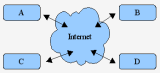
Las VPN's se usan generalmente para:
- Conexión entre diversos puntos de una organización a través de Internet
- Conexiones de trabajadores domésticos o de campo con IP's dinámicas
- Soluciones extranet para clientes u organizaciones asociadas con los cuales se necesita intercambiar cierta información en forma privada pero no se les debe dar acceso al resto de la red interna.
- Además brinda una excelente fiabilidad en la comunicación de usuarios móviles así como también al unir dos puntos distantes como agencias de una empresa dentro de una sola red unificada.
Descargas de la version GNU
https://openvpn.net/index.php/open-source/downloads.html
Sitio oficial
https://openvpn.net/index.php/license.html
Suscribirse a:
Entradas (Atom)